Raspberry Pi Tracker
20/08/2024
Overview
This project uses an AWS Lambda function to track an RSS feed and provide real-time updates on Raspberry Pi stock availability via AWS SNS. During the chip shortage, finding Raspberry Pi boards in stock was nearly impossible - this automated tracker solved that problem by monitoring stock feeds 24/7 and sending instant notifications.
Features
- RSS Feed Monitoring: Automatically checks RSS feeds for Raspberry Pi stock updates
- Instant Notifications: Sends SMS/email alerts when new stock is available via AWS SNS
- Serverless Architecture: Leverages AWS Lambda for scalability and cost-effectiveness
- Infrastructure as Code: Uses Terraform for easy deployment and management
- Scheduled Checks: CloudWatch runs the Lambda every 60 minutes (configurable)
Technology Stack
AWS Services Used:
- AWS Lambda: Runs the Python stock tracking script serverlessly
- Amazon SNS: Sends notifications to subscribers when stock is found
- Amazon CloudWatch: Schedules Lambda execution (default: every 60 minutes)
Development Tools:
- Python 3.13
- Terraform for infrastructure management
- AWS SDK (boto3) for AWS service integration
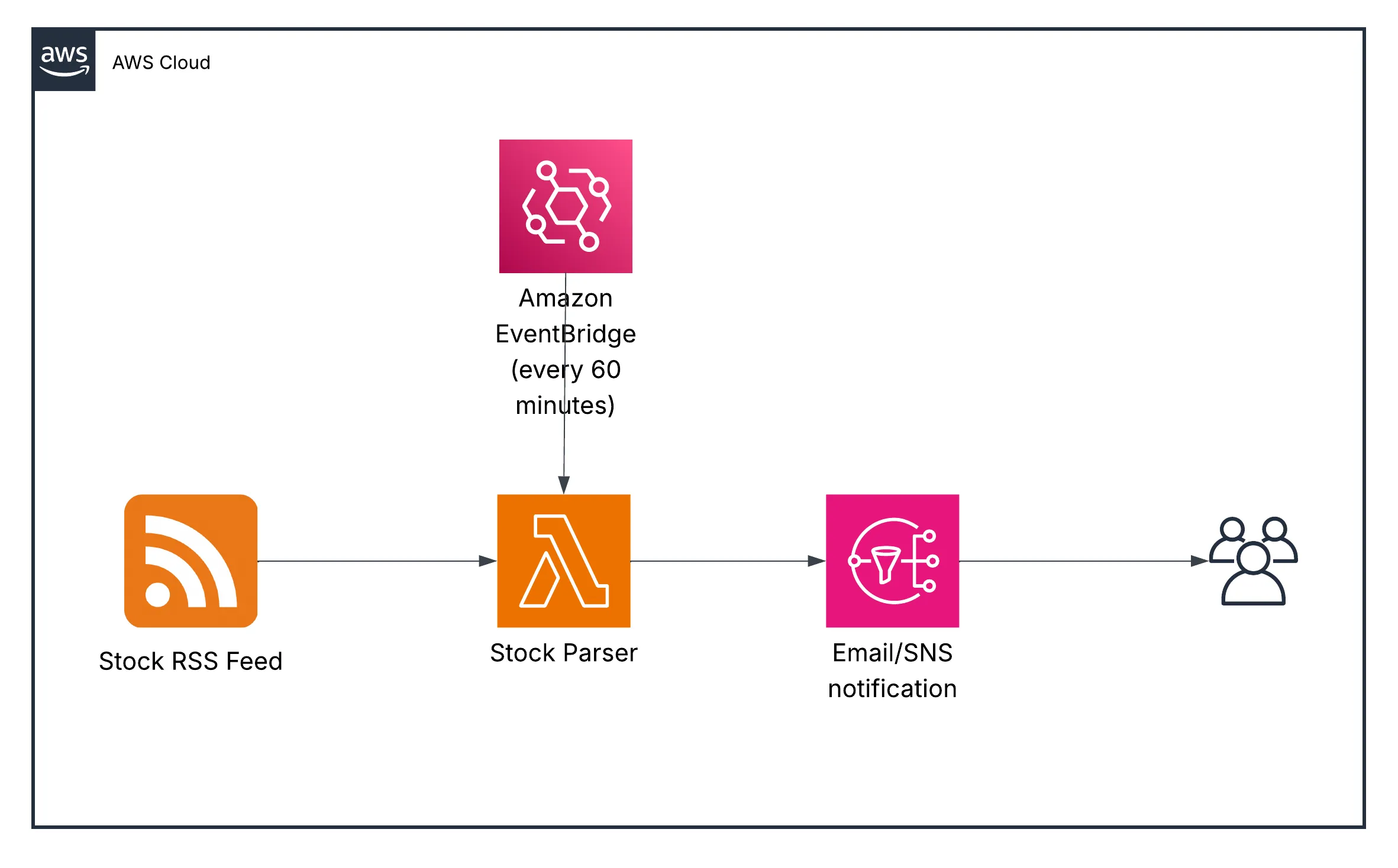
Architecture
The system follows a simple yet effective serverless pattern:
- CloudWatch triggers the Lambda function on a schedule
- Lambda fetches and parses the RSS feed
- Compares current stock with previous state
- If new stock detected, publishes message to SNS topic
- SNS sends notifications to all subscribers
Installation & Setup
Prerequisites:
- AWS account with appropriate permissions
- Python 3.13 installed locally
- Terraform installed
- AWS CLI configured
Step 1: Clone the repository
git clone https://github.com/WaterSpooner/RaspberryPiStock.git
cd RaspberryPiStock
Step 2: Install Python dependencies
cd lambda
pip install -r requirements.txt -t .
Step 3: Configure AWS credentials
aws configureStep 4: Deploy infrastructure
terraform init
terraform plan
terraform apply
After deployment, Terraform will output the SNS topic ARN. Subscribe to this topic to receive notifications!
Configuration
The CloudWatch schedule can be customized in the Terraform configuration:
resource "aws_cloudwatch_event_rule" "stock_check_schedule" {
  name                = "raspberry-pi-stock-check"
  description         = "Trigger Lambda every 60 minutes"
  schedule_expression = "rate(60 minutes)"
}
Change rate(60 minutes) to your desired frequency (e.g., rate(30 minutes) for more frequent checks).
Future Enhancements
- Add support for multiple RSS feeds/retailers
- Implement DynamoDB for state persistence
- Create a web dashboard to view stock history
- Add Discord/Slack webhook notifications
Results
This tracker successfully helped me buy Raspberry Pi 4s during the height of the chip shortage. The automated notifications arrived within minutes of stock appearing, giving a crucial advantage over manual checking.